Executive Summary
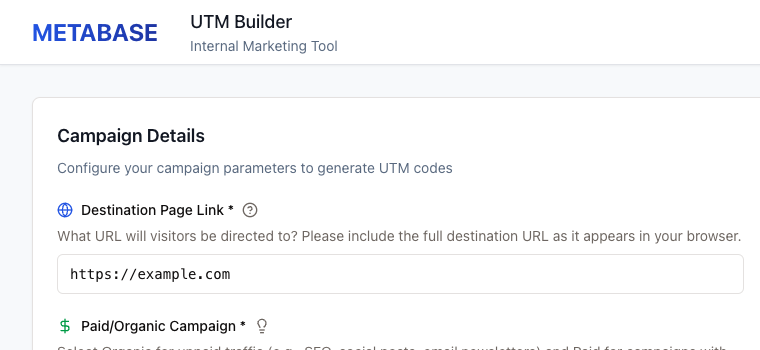
The UTM Campaign Builder helps campaign managers create consistent tracking links, configure advertising-platform templates, build promotional URLs, and process campaign ideas in bulk with AI assistance.
It turns repetitive campaign setup into a guided workflow with validation, recommendations, copy-ready outputs, saved history, and bulk processing. The product is a campaign launch-readiness and governance layer—not an ad-buying platform.
My role: Product strategy, requirements definition, workflow design, validation logic, AI guardrails, and portfolio narrative.
Naming note: The prototype uses the working name “Metabase.” This independent portfolio project is not affiliated with Metabase, Inc.
- Single-campaign UTM generation
- Rule-based warnings for selected GA4 source and medium conventions
- Google Ads and Microsoft Ads tracking-template support
- Sitelink and custom-parameter helpers
- Promotional campaign URL generation
- AI-assisted bulk campaign processing
- CSV and Google Ads Editor exports
- Optional campaign history when PostgreSQL is configured and healthy
- GTM-compatible event tracking
- An illustrative performance preview—not a live media forecast
Business Problem
| Pain point | Operational reality |
|---|---|
| Inconsistent naming | Marketers use different capitalization, abbreviations, and separators. |
| Incorrect UTMs | Required values may be missing, reserved, spaced, or inconsistently cased. |
| GA4 misclassification | Source and medium combinations can route traffic into unintended channels. |
| Google Ads setup errors | Templates, ValueTrack parameters, suffixes, and sitelinks are easy to misconfigure. |
| Manual operations | High-volume naming, copy, and exports create repetitive work and copy/paste errors. |
| Low launch visibility | Teams cannot easily see whether a package is ready or still needs review. |
Business impact
- Unreliable channel and campaign reporting
- Slower campaign launches
- More rework across marketing, analytics, and media teams
- Inconsistent attribution across platforms
- Reduced confidence in performance data
- Greater risk of publishing assets that require formatting or policy review
Product Vision
Make every campaign measurable, reviewable, and ready to launch without requiring every marketer to be a tracking expert.
The product direction is a standard workspace for translating campaign intent into governed tracking assets and campaign packages prepared for final review.
Business Objectives
- Reduce time required to create a standards-aligned campaign tracking package.
- Improve consistency of UTM naming and parameter formatting.
- Reduce preventable Google Ads tracking and upload errors.
- Give marketers an easy review step before activation.
- Support both one-off and high-volume campaign production.
- Make campaign setup knowledge repeatable instead of expert-dependent.
- Create a reusable internal source of campaign history.
- Build an extensible foundation for future ad-platform and analytics integrations.
- Demonstrate practical, human-reviewed AI assistance—not autonomous publishing.
Success Metrics
Percentage of campaign packages that meet defined readiness checks on the first review.
These are recommended production metrics. The prototype contains GTM event utilities but not a complete reporting dashboard.
| Metric | Definition | Initial target |
|---|---|---|
| Campaign setup time | Opening the tool to copying a valid package | Reduce by 50% |
| First-pass validity | Campaigns passing validation without correction | 90%+ |
| Naming compliance | Saved campaigns following the agreed format | 95%+ |
| Launch rework rate | Campaigns returned for tracking or format fixes | Reduce by 40% |
| Bulk processing adoption | Eligible multi-campaign requests using bulk workflow | 30%+ |
| AI acceptance rate | AI output accepted with minor edits | 70%+ |
| Export success rate | Export attempts producing a usable file | 99% |
| Data quality incidents | Missing, malformed, or misclassified tracking data | Downward trend |
| Review-to-launch time | Package completion to media activation | Establish baseline |
Target Users and Personas
Campaign Manager
Needs: Fast setup, clear options, copy-ready URLs, and confidence that required fields are complete.
Workflow: Choose campaign type → enter destination → select channel → accept suggestions → copy or save.
Performance Marketing Specialist
Needs: Platform templates, ValueTrack parameters, sitelinks, custom parameters, and exports.
Workflow: Configure paid-media tracking without manually rebuilding platform syntax.
Marketing Operations or Analytics Lead
Needs: Enforced standards, validation feedback, history, auditability, and adoption metrics.
Workflow: Govern taxonomy and identify tracking issues before campaigns launch.
Content or Creative Strategist
Needs: Campaign briefs translated into names, ad copy, sitelinks, and structured exports.
Workflow: Scale campaign concepts across products and audiences.
Reviewer or Approver
Needs: Format and policy-review warnings, generated outputs, and a record of what was approved.
Workflow: Review drafts now; use status, comments, and version history in a future release.
Business Scope
- UTM creation for organic, paid, and promotional traffic
- Source and medium recommendations plus campaign naming suggestions
- GA4-oriented validation and warnings
- Google Ads and Microsoft Ads tracking guidance
- ValueTrack templates, final URL suffixes, sitelinks, and custom parameters
- Promotional campaign URL generation
- AI-assisted bulk campaign, ad-copy, and sitelink suggestions
- CSV and Google Ads Editor export
- Campaign history retrieval and basic GTM-compatible usage events
- Buying or publishing ads directly
- Live synchronization with Google Ads, Microsoft Ads, Meta, LinkedIn, or StackAdapt
- Live campaign performance reporting or attribution modeling
- Budget pacing and bid optimization
- Identity, approval, or role management in the current prototype
- Guaranteed AI accuracy or autonomous publishing
- Replacing GA4, a CRM, an ad platform, or a marketing automation system
Business Process
Current state
- Receive a campaign brief.
- Manually choose source, medium, and campaign name.
- Construct UTM links and platform templates.
- Send the setup to analytics or media for review.
- Correct errors through email, chat, or spreadsheets.
- Launch the campaign.
- Discover some reporting issues later.
Proposed future state
- Open a single or bulk campaign workflow.
- Enter campaign context and destination URL.
- Receive platform-specific source, medium, and naming recommendations.
- Resolve formatting, taxonomy, and GA4 risks immediately.
- Generate URLs, templates, suffixes, sitelinks, copy, and exports.
- Review warnings and edit the output.
- Copy or export the approved package into the media workflow.
- Store the campaign record and usage events for future reference.
Value Proposition
Speed
Less manual URL and tracking-template construction.
Quality
Validation catches common errors before launch.
Enablement
Guidance makes expert practices accessible to more marketers.
Scale
Bulk processing turns repeated setup into a structured, reviewable workflow.
AI Product Strategy
AI co-pilot role
- Generate campaign names from the landing page, campaign type, and source.
- Generate Google Ads headlines and descriptions.
- Generate contextual sitelinks.
- Return a structured campaign package for review.
Human responsibility
- Product and offer accuracy
- Legal and regulatory review
- Brand voice
- Landing-page alignment
- Budget and targeting decisions
- Final platform activation
AI quality guardrails
- Validate URLs before processing.
- Restrict bulk input to 50 campaigns per request.
- Enforce Google Ads length limits in the response path.
- Show format, taxonomy, and policy-review warnings instead of hiding them.
- Start exported campaigns in a paused review state.
- Provide deterministic fallback content when AI processing fails.
- Never represent simulated performance as observed performance.
| Dimension | Evaluation question |
|---|---|
| Relevance | Does the output reflect the landing page and campaign type? |
| Compliance | Are character limits and required fields respected? |
| Brand safety | Does the copy avoid unsupported claims or risky language? |
| Naming quality | Does the name follow taxonomy and remain readable? |
| Edit distance | How much manual editing is required before approval? |
| Consistency | Do similar inputs produce comparable structures? |
| Failure behavior | Does the tool fail clearly and preserve the user's work? |
Stakeholders and Responsibilities
| Stakeholder | Responsibility |
|---|---|
| Marketing Operations | Own taxonomy, process, adoption, and governance |
| Performance Marketing | Validate platform templates and exports |
| Analytics | Own GA4 channel definitions and reporting quality |
| Brand / Legal | Review AI copy and promotional claims |
| Product Manager | Prioritize roadmap, define success, and manage tradeoffs |
| Engineering | Maintain the application, data, integrations, and reliability |
| Campaign users | Provide accurate inputs and review outputs |
Risks and Mitigations
| Risk | Impact | Mitigation |
|---|---|---|
| AI creates inaccurate copy | Brand or policy risk | Draft labels, human review, evaluations, and claim checks |
| Users trust simulated metrics | Poor planning decisions | Label the preview as illustrative until real data is connected |
| Taxonomy rules become stale | Reporting inconsistency | Version rules, assign an owner, and review changes |
| Platform syntax changes | Broken templates or imports | Version templates and maintain regression tests |
| No authentication | Campaign-data exposure | Add SSO, roles, and tenant isolation before production |
| Weak audit trail | Unclear asset history | Add versions, approvals, and an activity log |
| Database unavailable | Save and history failure | Add health checks, retries, error states, and monitoring |
| Large AI requests | Cost or latency spikes | Use limits, queues, progress states, caching, and budgets |
| Unsafe destination URLs | User or brand risk | Add domain policies, reputation checks, and allowlists |
Product Roadmap
Prototype foundation
- Guided UTM builder and validation
- Google Ads tracking helper
- Promotional campaign builder
- Illustrative performance preview
- Bulk AI workflow and CSV exports
- Campaign history
Production readiness
- Database monitoring and resilient error states
- Authentication, roles, and approval statuses
- Version history and audit log
- Automated unit, API, and end-to-end tests
- Real job progress
- AI validation, draft labels, and prompt/version tracking
Connected operations
- Google Ads and Microsoft Ads APIs
- GA4 validation and campaign status sync
- Domain and URL health checks
- Shared taxonomy administration
- Approval workflows and comments
- Workspace adoption reporting
Intelligence layer
- Learn from accepted edits and rejected outputs
- Recommend conventions from historical performance
- Detect duplicate or conflicting campaigns
- Compare planned and actual performance
- Explain campaign-quality scores
Product Decisions and Tradeoffs
UTM Campaign Builder: Designing a governed campaign operations workflow that combines deterministic validation with human-reviewed AI assistance.
- Built a working full-stack prototype.
- Translated GA4 and Google Ads rules into an interactive validation workflow.
- Designed a human-in-the-loop bulk generation experience.
- Separated deterministic validation logic from probabilistic AI generation.
- Created structured campaign output and export workflows.
- Guaranteed attribution accuracy
- Real campaign performance improvement
- Production-grade AI accuracy
- Live platform synchronization
- Actual conversion lift from the simulated preview
Business Acceptance Criteria
- 01A marketer can create a valid campaign package without manually constructing the URL.
- 02The tool explains why a source, medium, and campaign combination may be misclassified.
- 03Google Ads users can copy a tracking template and understand where to place it.
- 04Promotional campaign metadata appears in generated outputs.
- 05A user can process multiple campaigns and export the result.
- 06AI failures do not erase submitted campaign inputs.
- 07Generated suggestions are clearly differentiated from approved campaign assets.
- 08Saved campaign history is available when the database is configured and healthy.